

Watch how I create a professional looking book cover in under 1hr... live.
She said "Nobody would imagine that's what we started from."

Hey Revenue Writer,
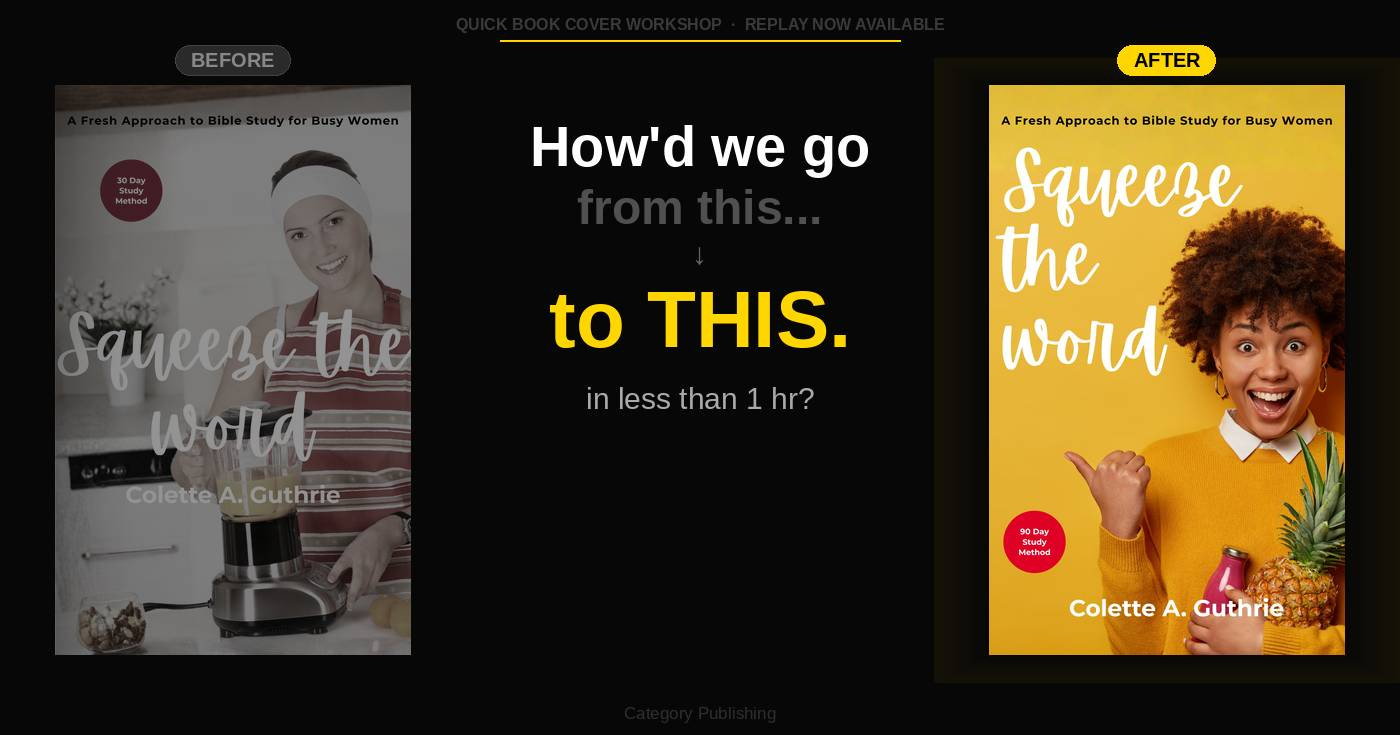
Look at that first cover.
It’s fine. It’s not embarrassing. But it’s not stopping anyone mid-scroll either.
Now look at the second one.
Bold yellow background. Vibrant woman. Red circle popping. Script title that actually reads on a thumbnail. That’s a cover people click.
Here’s the kicker — we built both of them. Live. In under an hour.
Colette came to the Quick Book Cover Workshop with a Bible study book called Squeeze the Word and a cover that looked like a thousand other self-published books. Good concept. Lame execution. The kind of cover where you know, you just know, it was made in Canva by someone who isn’t a designer.
By the end of the workshop, she had a cover that stood next to bestsellers.
Her words, not mine: “Nobody would imagine that’s what we started from.”
That’s the goal. Every time.
The cover’s job isn’t to be pretty. It’s to stop someone in three seconds on a thumbnail-sized bookshelf called Amazon and make them click. That’s it. And most self-published covers fail that test before the book even gets a chance.
We ran Colette’s final cover through the thumbnail test, the click test, and the three-second test. It passed all three.
If you want to see exactly how we got there — the method, the tool I built to speed up the process, and the live Canva build from ugly to awesome — the replay is up now.
Watch it before it comes down.
— Chris
P.S. The method is called QUICK. Five steps. One to two hours max. And you don’t need to be a designer. I was an insurance adjuster for 15 years. I figured it out. You can too.
To celebrate this honour I am going to set up my pre-order on Amazon.😄